Application Firewalls: Complete Multi-Platform Guide
🚀 Introduction to Application Firewalls
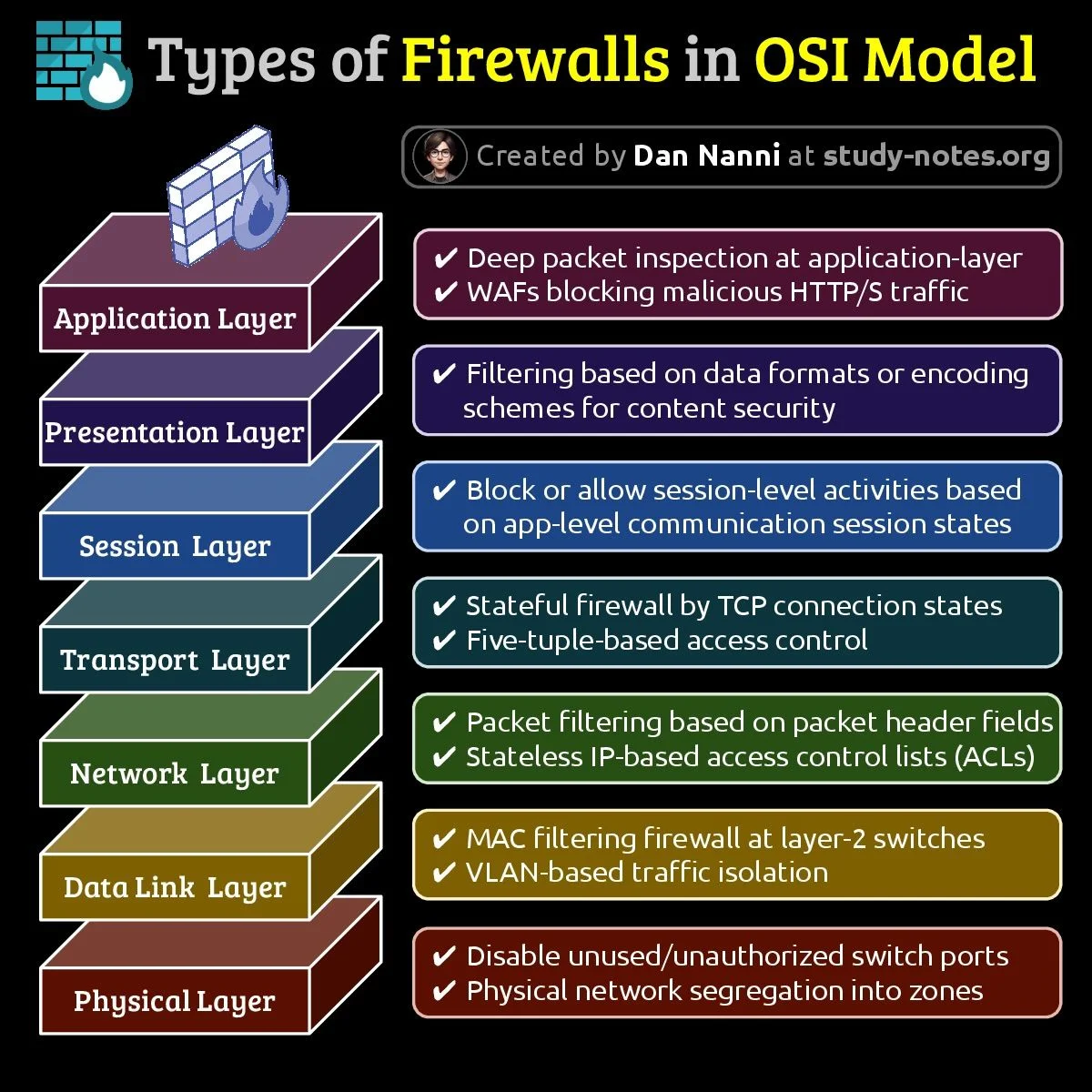
SafeITExperts offers this comprehensive guide, a multi-platform analysis (Windows, Linux, BSD, macOS) and practical implementations for IT admins and security devs. Application firewalls (Web Application Firewalls, WAF) are essential to protect web applications against modern cyberattacks. Unlike classic network firewalls, which operate at layers 3 (network, IP) and 4 (transport, TCP/UDP) of the OSI model, WAFs perform deep inspection of data content at layer 7 (application, HTTP/HTTPS).
OWASP Top 10 Vulnerabilities: Focus on Injections
WAFs protect against SQL injections, XSS, DDoS, and other OWASP Top 10 vulnerabilities. This table presents the most common injections, their mechanism, and their risk level according to the OWASP ranking.
| Injection Type | Description | Example | Risk | OWASP Source |
|---|---|---|---|---|
| SQL Injection (SQLi) | Insertion of malicious SQL code into a request to manipulate the database. | ' OR '1'='1 | Unauthorized access, data deletion. | A03: Injection |
| Cross-Site Scripting (XSS) | Injection of JavaScript scripts to execute code in the browser. | <script>alert('XSS')</script> | Cookie theft, malicious redirection. | A03: Injection |
| Command Injection | Execution of arbitrary system commands via user input. | ; rm -rf / | Complete server compromise. | A03: Injection |
| LDAP Injection | Manipulation of LDAP requests to bypass authentication. | *)(uid=* | Sensitive data leakage. | A03: Injection |
| XML External Entity (XXE) | Injection of external entities into XML to read files or SSRF. | <!ENTITY xxe SYSTEM "file:///etc/passwd"> | File exposure, DoS. | A04: Insecure Design |
| Path Traversal | Manipulation of paths to access unauthorized files. | ../../etc/passwd | Access to sensitive files. | A01: Broken Access Control |
Source: OWASP Top 10 2021-2025 (OWASP).
⚙️ Architecture and Operation
WAFs use Deep Packet Inspection (DPI), application filtering, and contextual inspection to secure traffic. Here is a flow example:
📚 The OSI Model: Understanding Network Layers
The OSI (Open Systems Interconnection) model divides network operation into 7 layers. Each layer has a specific role, like a team in a factory passing work to the next team. This table presents each layer with its role, concrete examples, and a simplified explanation.
| Layer | Name | Role | Example | Explanation for Beginners |
|---|---|---|---|---|
| 1 | Physical | Transmission of raw bits via hardware | Ethernet cables, Wi-Fi | Like wires carrying electricity in a house. |
| 2 | Data Link | Manages communication between neighbor devices | MAC, switches | Like ensuring two neighbors speak the same language. |
| 3 | Network | Defines paths for data (routing) | IP, routers | Like a GPS guiding data to the right address. |
| 4 | Transport | Ensures reliable data delivery | TCP, UDP | Like a delivery service checking that everything arrives intact. |
| 5 | Session | Manages sessions between applications | NetBIOS, RPC | Like organizing a conversation between two programs. |
| 6 | Presentation | Formats and translates data | SSL, JPEG | Like translating text so it is understandable. |
| 7 | Application | Interacts directly with the user | HTTP, FTP | What you see, like a website or an app. |
OSI Layers and Associated Protocols Table
The OSI (Open Systems Interconnection) model is a theoretical and conceptual model that describes the 7 layers of network communication. It is crucial to understand that the OSI model itself is not a protocol; it is a roadmap that helps to standardize and categorize the functions of different protocols.
Actual protocols used on the Internet (such as TCP, IP, HTTP, etc.) most often follow the TCP/IP (4 or 5 layers) model, which is a practical implementation of the OSI model. The table below associates real protocols and technologies with the OSI layers to which they functionally correspond.
| OSI Layer | N° | Name | Main Protocols & Technologies | Main Role and Function |
|---|---|---|---|---|
| 7 | Application | Application Layer | HTTP, HTTPS, FTP, SMTP, POP3, IMAP, DNS, DHCP, SNMP, Telnet | Interface between user and network. Provides network services to applications (web browsing, email, file transfer). |
| 6 | Presentation | Presentation Layer | SSL, TLS, JPEG, MPEG, GIF, ASCII, Encryption | Translation, encryption, and compression of data. Ensures application layer data is understood by the other system. |
| 5 | Session | Session Layer | NetBIOS, RPC (Remote Procedure Call), PPTP, Sockets | Establishes, manages, and terminates connections (sessions) between applications. Manages synchronization and dialogue. |
| 4 | Transport | Transport Layer | TCP (Transmission Control Protocol), UDP (User Datagram Protocol) | Ensures complete data delivery. Manages flow control, segmentation, and data reassembly. TCP is reliable (with acknowledgement), UDP is faster but unreliable. |
| 3 | Network | Network Layer | IP (Internet Protocol - IPv4/IPv6), ICMP, IPsec, OSPF, BGP, Routers | Logical addressing (IP addresses) and routing packets through the network (from one network to another). Determines the best path. |
| 2 | Data Link | Data Link Layer | Ethernet, PPP, Switch, Bridge, MAC (Media Access Control), VLAN, Frame Relay | Physical addressing (MAC addresses). Manages frame transmission on physical media. Error detection and correction. |
| 1 | Physical | Physical Layer | RJ45 Cable, Fiber optic, Hub, Repeater, Wi-Fi (IEEE 802.11), Electrical/optical signals | Raw bit transmission (0 and 1) on the physical medium (cable, radio). Defines electrical, mechanical, and functional characteristics. |
Relationship with the TCP/IP Model (Internet Model)
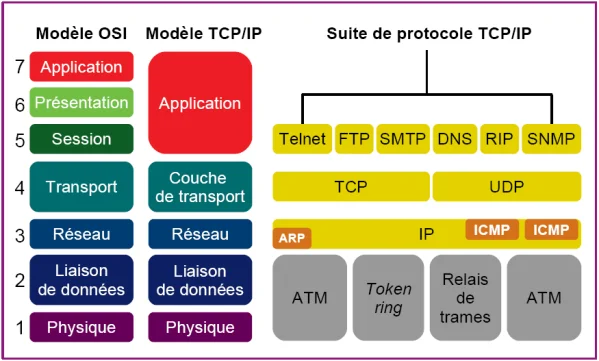
It is very important to note the correspondence between the OSI (7-layer) model and the TCP/IP (4-layer) model that is actually used:
| TCP/IP Model | OSI Model | Key Protocols |
|---|---|---|
| Application (Layer 4) | Application (7) Presentation (6) Session (5) | HTTP, FTP, DNS, SMTP |
| Transport (Layer 3) | Transport (4) | TCP, UDP |
| Internet (Layer 2) | Network (3) | IP, ICMP, Routing |
| Network Access (Layer 1) | Data Link (2) Physical (1) | Ethernet, Wi-Fi, PPP |
In summary: The OSI model is a perfect pedagogical and conceptual tool to understand and learn network operation. When you implement or troubleshoot a network, you work primarily with TCP/IP suite protocols.
🖥️ Overview by Operating System
Linux solutions offer flexibility and performance with open source and commercial options.
- OpenSnitch: Mature and active solution for all distributions
- BunkerWeb: Modern WAF for containerized environments
- Endian Firewall: Complete UTM with dedicated Linux distribution
macOS offers elegant solutions with native integration into the Apple ecosystem.
- Little Snitch: Reference commercial solution since 2003
- LuLu: Free alternative by Objective-See, very active
Windows offers robust integration with native and third-party solutions.
- Windows Defender Firewall: Integrated, basic application capabilities
- Comodo Internet Security: Complete suite with advanced HIPS
BSD systems distinguish themselves by their robustness and innovative approach.
- Zenarmor: Commercial plugin for OPNsense with advanced DPI
🔍 Detailed Analysis by Solution
💡 Click or tap each card to reveal detailed analysis and technical specifications on the back.
Latest version: v1.7.2 (August 2025)
Type: Outbound Application L7
License: GPL v3 (free)
Maintenance: Very active
Key features: Interactive outbound connection filtering, malicious domain blocking, SIEM integration
Latest version: v1.5.x (active)
Type: WAF L7
License: AGPL v3 (free)
Maintenance: Very active
Key features: ModSecurity integration with OWASP rules, adaptive anti-bot protection, automated SSL/TLS certificate management
Latest version: v6.2.2 (March 2025)
Type: Bidirectional Firewall L7
License: Commercial ($45)
Maintenance: Active
Key features: Real-time global connection map, automatic network profiles, TLS inspection
Latest version: 2025 updates
Type: NGFW + Application Control L7
License: Commercial / Freemium
Maintenance: Active
Key features: Deep Packet Inspection, cloud signature database, real-time threat intelligence
📊 Complete Comparison Matrix
| Solution | Target OS | First Version | Current Version | Firewall Type | License | 2025 Maintenance |
|---|---|---|---|---|---|---|
| OpenSnitch | Linux (all distros) | April 2017 | v1.7.2 (August 2025) | Outbound App L7 | GPL v3 (free) | ✅ Very active |
| BunkerWeb | Linux / Docker / Kubernetes | 2019 | v1.5.x (active) | WAF L7 | AGPL v3 (free) | ✅ Very active |
| Zenarmor | FreeBSD / OPNsense | ~2019 | 2025 updates | NGFW + App Control L7 | Commercial / Freemium | ✅ Active |
| Endian Firewall | Linux (own distro) | 2003–2005 | Active (commercial) | Complete UTM L3–L7 | Hybrid GPL / Commercial | ✅ Active (commercial) |
| Little Snitch | macOS | 2003 | v6.2.2 (March 2025) | Bidirectional Firewall L7 | Commercial ($45) | ✅ Active |
| LuLu | macOS 10.15+ | ~2018 | v3.1.5 (April 2025) | Outbound App L7 | Free (open source) | ✅ Active |
| Windows Defender Firewall | Windows (integrated) | 2001 (XP SP2) | Integrated Windows 11 | Network L3–L4 + Basic App | Integrated Microsoft | ✅ Maintained by Microsoft |
| Comodo Internet Security | Windows | ~2008 | v12.2.x (active) | Bidirectional Firewall L7 | Freemium / Commercial | ✅ Active |
🔮 Future Trends
In 2025, WAFs are evolving with the integration of AI and Zero Trust architectures. Here are the main trends:
🤖 AI and Machine Learning
WAFs use AI to detect anomalies in real time (e.g., CrowdSec with ML).
🔒 Zero Trust
Continuous verification of identity and devices, integrated into modern WAFs.
☁️ Cloud and Containers
WAFs like BunkerWeb adapt to Kubernetes and cloud-native environments.
| Solution | AI/ML | Zero Trust | Cloud-Native | Example Use Case |
|---|---|---|---|---|
| CrowdSec | Behavioral analysis | Okta integration | Docker, Kubernetes | DDoS attack detection |
| Cloudflare WAF | Heuristic detection | Zscaler compatible | Serverless | Malicious bot blocking |
| FortiWeb | ML for XSS/SQLi | Multi-factor auth | AWS, Azure | REST API protection |
🧠 AI Monitoring
🛡️ Modern WAFs (Web Application Firewalls) increasingly integrate advanced monitoring tools based on Artificial Intelligence (AI) and Machine Learning (ML). This evolution is radically transforming their ability to detect and counter cyberthreats in a proactive and adaptive manner.
- Behavioral detection and anomaly analysis: Unlike traditional WAFs, which rely mainly on pre-established signatures to identify known threats, modern WAFs use ML algorithms to establish a baseline of normal behavior for an application or user.
- Drastic reduction of false positives: Contextual and behavioral analysis allows better distinction between legitimate traffic (even if unusual) and truly malicious activity.
- Predictive and proactive analysis: By analyzing massive volumes of traffic data in real time, AI algorithms can anticipate attack trends.
| Traditional WAF Function | Improvement brought by AI |
|---|---|
| Detection via known threat signatures | Behavioral detection of new and unknown (zero-day) threats |
| Static and manual security rules | Dynamic, self-adaptive, and self-learning security rules |
| High false positive rate alerting incorrectly on legitimate traffic | Massive reduction of false positives thanks to contextual analysis |
🛠 Technical Challenges and Solutions
Modern WAFs must overcome several challenges to remain effective:
⚡ Performance
WAFs must minimize latency while inspecting massive volumes of data. Solution: Optimization via asynchronous DPI.
🧩 Complexity
Rule management can become complex. Solution: GUI interfaces and automation via scripts.
⚠️ False Positives
WAFs can block legitimate requests. Solution: Threshold adjustment with ML.
📈 Case Studies and Benchmarks
Here are two concrete use cases for WAFs:
🛒 E-Commerce on Linux with BunkerWeb
An e-commerce platform deployed BunkerWeb to protect its REST APIs against SQL injections. Results: 99.9% of attacks blocked, average latency of 1 ms under 10k req/s.
🏢 Enterprise BSD with Zenarmor
An enterprise used Zenarmor on OPNsense to block social networks during working hours, reducing bandwidth usage by 30%.
🏠 Special Use Case: qBittorrent Configuration
A user installs qBittorrent on their machine and wants to authorize or restrict its connections via various application firewalls. Here are the detailed steps for each solution.
OpenSnitch (Linux)
- Start the daemon and interface:
sudo systemctl start opensnitchdandopensnitch-ui & - Start qBittorrent and generate the rule request window.
- In the OpenSnitch popup: Allow or Deny and set the duration.
- Refine the rule (optional): Edit the rule to filter by port (e.g., 6881) or protocol.
LuLu (macOS)
- Install LuLu from Objective-See and launch the application.
- Open qBittorrent: an alert appears "App qbittorrent wants network access".
- In the LuLu notification: Select "Allow" for permanent access, or "Block" if you want to deny.
- To customize: Open LuLu → Rules tab → find
qbittorrent→ edit permissions.
Comodo Internet Security (Windows)
- Launch Comodo Internet Security and go to Firewall → Application Rules.
- Click Add and navigate to
C:\Program Files\qBittorrent\qbittorrent.exe. - In the rule creation window: Access: "Allow", Direction: "Both".
- Ports & Protocols tab: Add TCP port
6881and/or UDP6881.
Zenarmor (OPNsense)
- From the OPNsense interface, install and activate the Zenarmor plugin.
- Go to Zenarmor → Policies → Application Control.
- Click Add New Rule: Application "qBittorrent", Action: "Allow".
- Save and Apply Policy.
Windows Defender Firewall (Windows)
- Open Control Panel → System and Security → Windows Defender Firewall → Allow an app or feature.
- Click Change settings, then Allow another app….
- Browse to
C:\Program Files\qBittorrent\qbittorrent.exe. - Check Private and/or Public boxes depending on the network used.
📚 Application Firewall Glossary
Discover the essential terms to master WAFs in 2025
🧠 Application Firewall Quiz
Test your knowledge of application firewall technologies
You have finished the quiz!
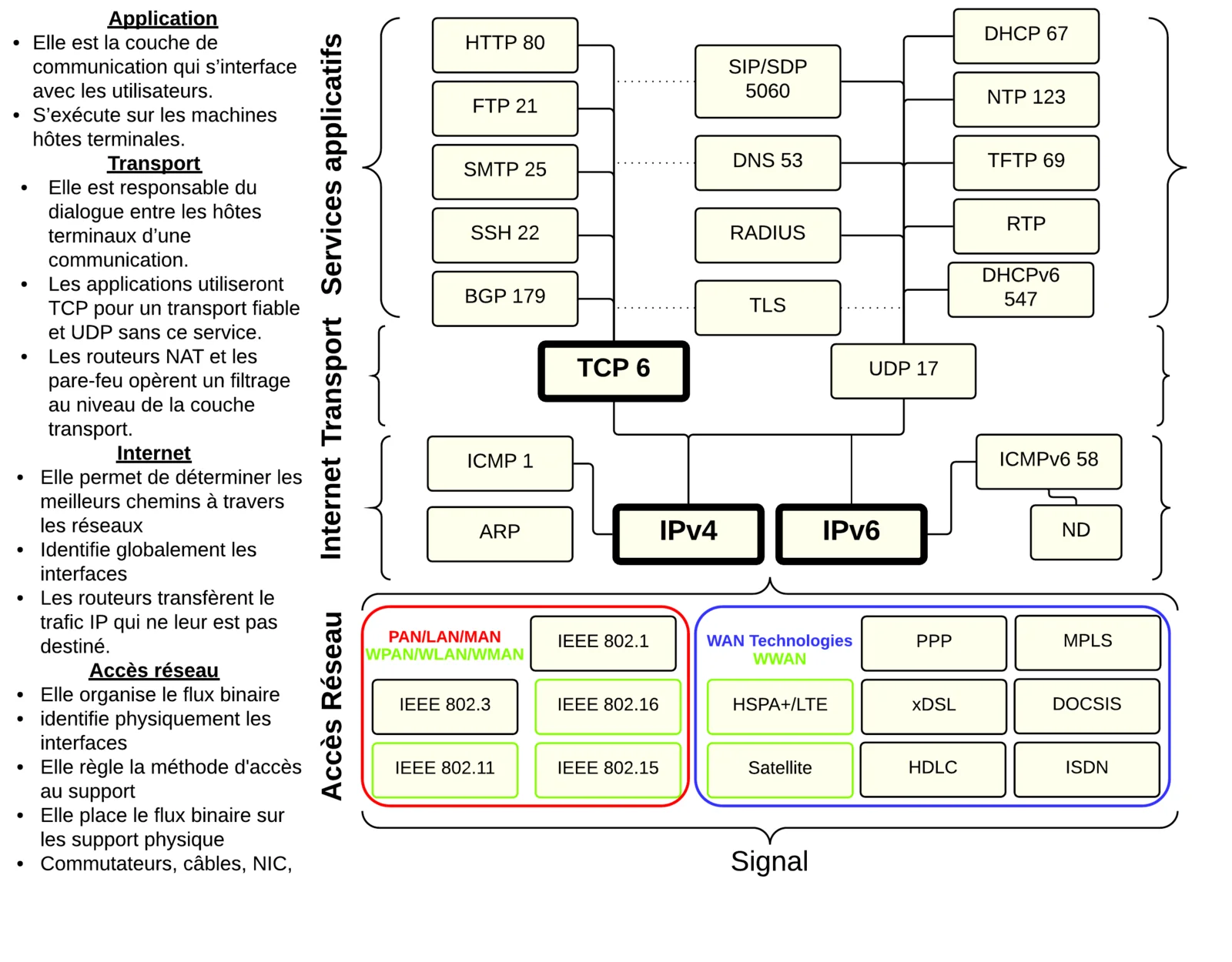
🖼️ Reference Architecture Diagrams
Below are the comprehensive reference diagrams illustrating the 7-layer OSI model architecture, network protocols, and application firewall inspection levels.
🌟 Conclusion
Application firewalls are essential tools for securing web applications in 2025. Windows offers robust integration with Defender and AppLocker, Linux excels in flexibility with BunkerWeb, BSD distinguishes itself by the performance of Zenarmor, and macOS combines elegance and efficiency with Little Snitch and LuLu. Trends like AI, Zero Trust, and cloud-native deployments are redefining modern WAFs.
To stay protected, adopt a proactive approach: update your systems, audit your rules, and integrate advanced monitoring solutions.
📚 Official Sources
Find here all the sources and references used for writing this guide, categorized.
🔐 Security and Firewall
Official pfSense FreeBSD documentation for stateful packet filtering and L3-L7 rule management.
Linux kernel packet classification and firewall framework replacing legacy iptables.
Global cybersecurity reports and research on web application attack vectors and WAF mitigations.
Authoritative awareness document detailing the top 10 critical security risks for web applications.
🖥️ Specific Platforms
Microsoft technical documentation on Windows integrated network security and application rules.
Apple official support guide for configuring application-level socket filtering on macOS.
Technical community discussions and implementation guidelines for application firewalls on BSD.
In-depth engineering comparison between FreeBSD packet filters (PF, IPFW) and Linux firewalls.
🤖 AI and Zero Trust
Conferences and technical whitepapers on AI-driven cloud infrastructure and threat mitigation.
Deep dive into specialized application firewalls designed to guard generative AI and LLMs.
Technical runtime documentation on monitoring, securing, and defending enterprise AI deployments.
Adaptive edge security and WAF defenses shielding AI workloads from automated abuse.
Comprehensive primer on SASE architecture, zero-trust network access, and continuous verification.
🛠️ Tools and Software
Official open-source repository of the interactive application firewall for Linux desktops and servers.
Next-generation open-source Web Application Firewall built on NGINX with container support.
Layer 7 application control and deep packet inspection engine for OPNsense and FreeBSD.
Unified Threat Management (UTM) platform combining open-source routing, firewall, and VPN.
Premium macOS network monitoring utility and interactive bidirectional application firewall.
Free, open-source macOS outbound firewall designed to detect and block unauthorized traffic.
Modular application interceptor and connection filter tailored for macOS environments.
📊 Reports and Studies
Authoritative research, vulnerability analysis, and real-time telemetry on worldwide cyber threats.
Educational resource explaining Web Application Firewall architecture and DDoS protection.
Technical exploration of behavioral inspection and attack pattern matching within modern WAFs.
Whitepaper analyzing emerging threats and multi-vector defenses required for WAAP architectures.
👥 Comments
Comment on this article